


HP ZBook Firefly G11: The Ultimate Mobile Workstation for Professionals?
Introduction
If you've been shopping for a lightweight laptop that can still handle serious professional work, you've probably come across the HP ZBook Firefly G11. It's marketed as a mobile workstation a category that promises desktop-like reliability and performance in a body thin enough to slip into a backpack.
But does it actually deliver? In this article, we'll break down everything you need to know about the HP ZBook Firefly G11: its processor options, display choices, battery life, security features, and connectivity. We'll also stack it up against two very different competitors the gaming-meets-productivity ASUS ROG Flow Z13 and the business-classic Lenovo ThinkPad X1 Carbon Gen 13 so you can decide which machine actually fits your workflow.
By the end, you'll have a clear, no-nonsense picture of who this laptop is for, where it shines, and where it falls short.
What Is the HP ZBook Firefly G11?
The ZBook Firefly line sits at the entry point of HP's ZBook mobile workstation family. Unlike the beefier ZBook Power or ZBook Fury models, the Firefly is built for professionals who need workstation-grade certification and security features but don't necessarily need a heavy discrete GPU for 3D rendering or CAD-heavy workloads.
The G11 generation comes in two chassis sizes a 14-inch and a 16-inch model and is available with either Intel or AMD processors, giving buyers real flexibility depending on whether they prioritize battery efficiency, raw multi-core performance, or price.
Key Specifications at a Glance
Processor Options
-
Intel Core Ultra 5 / Ultra 7 (Meteor Lake series, including the Ultra 7 165H and 155U variants)
-
AMD Ryzen PRO 5 / 7 / 9 processors on the "G11 A" variant
Memory and Storage
-
Up to 64GB of DDR5 RAM (5600 MHz)
-
Up to 1TB of PCIe NVMe SSD storage, expandable depending on configuration
Display Options
-
14-inch WUXGA (1920 x 1200) IPS anti-glare panel, up to 800 nits
-
14-inch WQXGA (2560 x 1600) 120Hz panel with 100% DCI-P3 coverage
-
Optional 16-inch OLED panel for richer contrast and deeper blacks
-
16:10 aspect ratio across the board, which shows roughly 11% more vertical screen space than a standard 16:9 display
Graphics
-
Integrated Intel or AMD graphics on most configurations
-
Optional NVIDIA RTX A-series discrete graphics for light professional GPU workloads
Connectivity
-
Wi-Fi 6E and Bluetooth 5.3
-
Optional 4G LTE or 5G with eSIM/nanoSIM support
-
Two Thunderbolt 4 ports, USB Type-A ports, HDMI 2.1, and an optional security card slot
Camera and Audio
-
5MP camera with AI-based noise suppression for calls
-
Dual Realtek stereo speakers with HP Audio Control software
Weight
-
Starting around 3.1 lbs for the lightest AMD configuration, making it one of the more portable workstation-class laptops on the market
Design and Build Quality
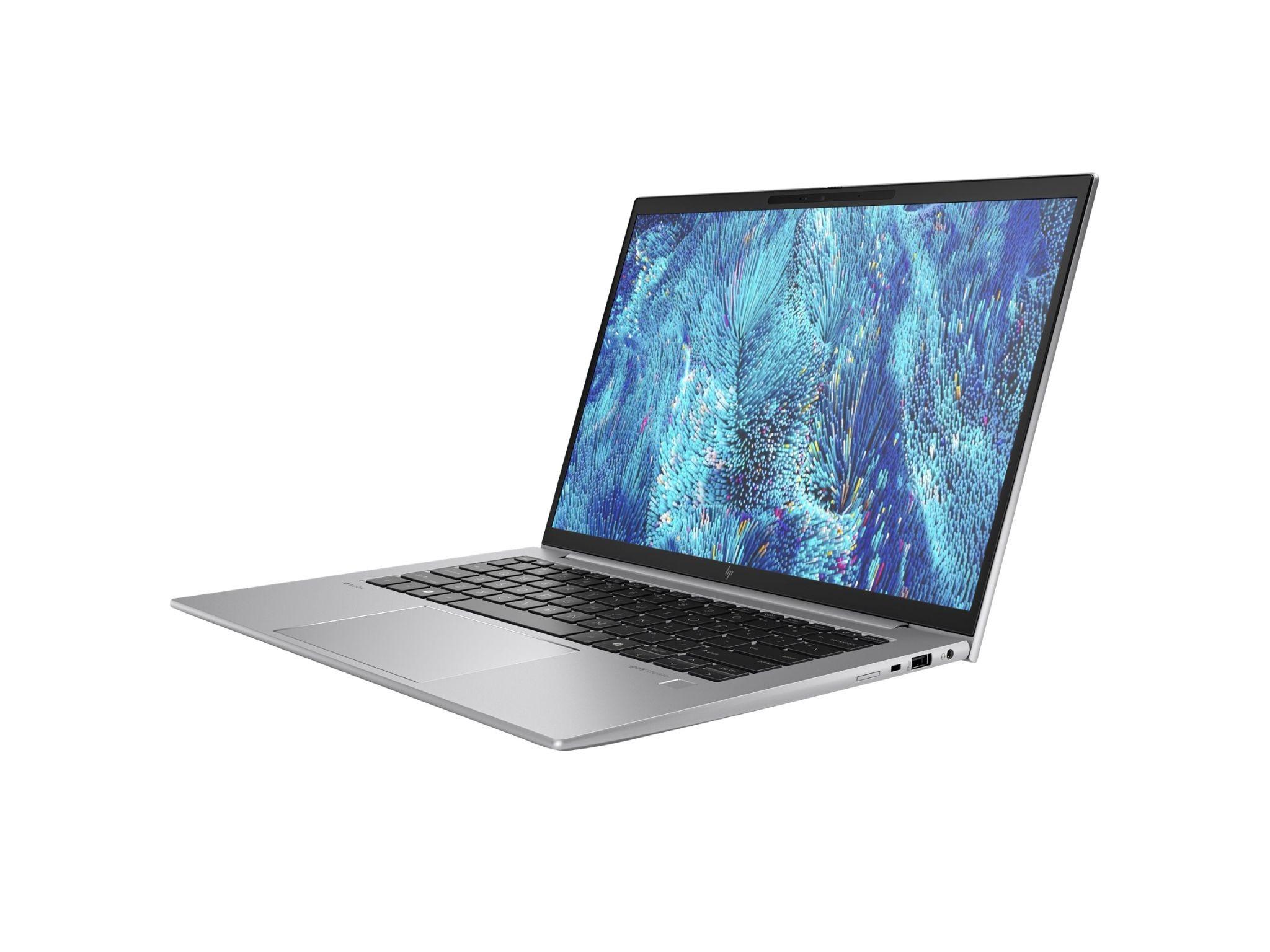
HP made some deliberate design choices with the G11 generation that long-time ZBook users will notice immediately. The somewhat dated "Z" logo has been replaced with a cleaner HP premium badge, the crisscross speaker grilles are gone, and the overall chassis has softer, more rounded edges. It feels less like a purely industrial tool and more like a refined business laptop that happens to carry workstation certification.
One functional change worth mentioning: HP dropped the old column of Home, Page Up, Page Down, and End keys in favor of a dedicated Copilot key, reflecting the industry-wide push toward AI integration. The awkward dual pointing stick that used to sit above the touchpad has also been removed a change most users will appreciate.
Port placement remains sensible. On the left side, you get a full-size HDMI 2.1 port, a 5Gbps USB Type-A port, and two Thunderbolt 4/USB-C ports supporting Power Delivery and DisplayPort 1.4. The right side houses a headphone/microphone jack, another USB-A port, and an optional smart card reader slot for enterprise security setups.
Performance: Who Is This Laptop Actually For?
The ZBook Firefly G11 isn't trying to be a gaming laptop or a rendering powerhouse. Its Intel Core Ultra and AMD Ryzen PRO processor options are built around efficient multitasking, video conferencing, light content creation, and everyday professional workloads think spreadsheets, CAD previews, video calls, and multiple browser tabs with heavy applications running in the background.
Where it stands out is in scenarios requiring:
-
Business-grade security — features like HP Wolf Security, Sure Click, and Sure Sense come standard on many configurations, along with an optional fingerprint reader and IR camera for Windows Hello.
-
Professional certifications — ISV (independent software vendor) certifications for tools like AutoCAD, SolidWorks, and Adobe Creative Cloud make it a safer bet for creative and engineering professionals than a typical consumer ultrabook.
-
All-day mobility — the lightweight chassis (as low as 3.1 lbs) and long battery life target consultants, architects, and remote engineers who move between meetings and job sites.
If your workload leans toward heavy 3D rendering, simulation, or gaming, you'll want to look at HP's ZBook Power or ZBook Fury lines instead the Firefly's integrated or entry-level discrete graphics options aren't built for that kind of sustained GPU load.
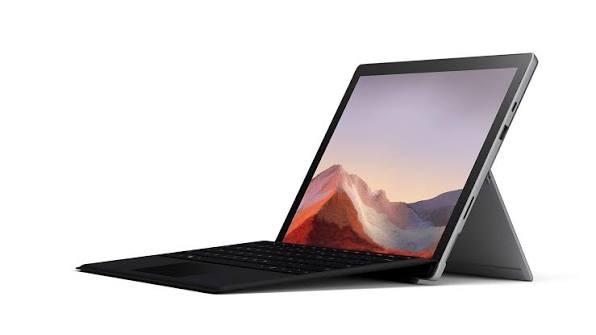
HP ZBook Firefly G11 vs. ASUS ROG Flow Z13
It might seem like an odd comparison one is a business workstation, the other a convertible gaming tablet but both target buyers who want serious performance in a genuinely portable form factor.
|
Feature |
HP ZBook Firefly G11 |
ASUS ROG Flow Z13 |
|
Form factor |
Traditional clamshell laptop |
2-in-1 detachable tablet |
|
Target audience |
Business & engineering professionals |
Gamers & creators wanting portability |
|
GPU |
Integrated / entry discrete RTX A-series |
Discrete NVIDIA RTX GPU (gaming-grade) |
|
Certifications |
ISV certified (CAD, engineering software) |
Not workstation-certified |
|
Security |
HP Wolf Security, vPro, fingerprint/IR options |
Consumer-grade security features |
|
Portability |
3.1 lbs and up |
Ultra-compact tablet form, detachable keyboard |
The ASUS ROG Flow Z13 wins if your priority is gaming performance or GPU-heavy creative work in a genuinely tiny footprint. But if you need enterprise security, professional software certification, and the reliability that comes with a business support structure, the ZBook Firefly G11 is the more sensible choice for a workplace environment.
HP ZBook Firefly G11 vs. Lenovo ThinkPad X1 Carbon Gen 13
This is a much closer fight, since both machines target the same buyer: a business professional who wants a lightweight, secure, high-performance laptop.
The Lenovo ThinkPad X1 Carbon Gen 13 is famous for its keyboard feel, legendary durability (MIL-STD-810H testing), and class-leading battery efficiency. It's often considered the gold standard for corporate ultrabooks.
The ZBook Firefly G11 counters with:
-
Workstation-grade ISV certifications the X1 Carbon doesn't offer
-
More display options, including a 120Hz WQXGA panel and an OLED option on the 16-inch model
-
Comparable security suite through HP Wolf Security versus Lenovo's ThinkShield
If your work involves engineering or design software that benefits from ISV certification, the ZBook Firefly has a real edge. If you simply want the most refined, battle-tested business ultrabook on the market with the best keyboard in the industry, the X1 Carbon Gen 13 remains a tough act to beat.
Real-World Use Case: A Mobile Design Consultant
Consider a freelance interior design consultant who travels between client sites and needs to run rendering previews in SketchUp or AutoCAD while also joining video calls from hotel lobbies and coffee shops. For this kind of professional, the ZBook Firefly G11 configuration with the Intel Core Ultra 7 processor, 32GB of RAM, and the optional NVIDIA RTX A500 discrete GPU offers enough graphics headroom for CAD previews without the bulk of a full workstation like the ZBook Fury. The 5G/4G cellular option also means the consultant isn't dependent on unreliable public Wi-Fi networks a genuine advantage over most competitors, including the X1 Carbon and ROG Flow Z13, neither of which offers the same breadth of cellular configurations.
Pros and Cons
Pros
-
Genuinely lightweight for a workstation-certified laptop (starting around 3.1 lbs)
-
Strong display lineup, including a 120Hz WQXGA option and OLED on the 16-inch model
-
ISV certifications for professional creative and engineering software
-
Robust security suite (HP Wolf Security, optional vPro, fingerprint, and IR camera)
-
Flexible processor choice between Intel Core Ultra and AMD Ryzen PRO
-
Cellular connectivity options (4G/5G) not commonly found on rivals
Cons
-
Not suited for heavy gaming or sustained GPU rendering workloads
-
Higher price point than comparable consumer ultrabooks
-
Battery life trails dedicated efficiency-focused laptops like the ThinkPad X1 Carbon
-
Keyboard, while improved, still isn't quite at ThinkPad's level
-
USB Type-A ports remain limited to 5Gbps speeds, which feels dated
Frequently Asked Questions
Is the HP ZBook Firefly G11 good for gaming? Not really. It's designed for business and light creative workloads. If gaming is a priority, the ASUS ROG Flow Z13 or a dedicated gaming laptop will serve you far better.
What's the difference between the Firefly G11 and Firefly G11 A? The standard G11 uses Intel Core Ultra processors, while the "G11 A" variant is built around AMD Ryzen PRO chips. Both share a similar chassis and feature set, but the AMD version tends to start lighter, at around 3.1 lbs.
Does it support 5G connectivity? Yes, select configurations offer optional 4G LTE or 5G modules with both eSIM and nanoSIM support, which is a genuine advantage for professionals who travel frequently.
How does it compare in battery life to the ThinkPad X1 Carbon Gen 13? The ThinkPad line has historically prioritized battery efficiency more aggressively, so the X1 Carbon Gen 13 generally edges out the ZBook Firefly G11 in real-world battery testing, though the gap varies by configuration and display choice.
Is it worth buying over a standard business ultrabook? If you rely on ISV-certified professional software (CAD, engineering, or creative production tools) or need workstation-level security compliance, yes. If you just need a general productivity laptop, a standard ultrabook may offer better value.
Conclusion
The HP ZBook Firefly G11 carves out a smart niche: it's a mobile workstation that doesn't feel like a compromise on portability. With flexible processor options, a genuinely strong display lineup, and enterprise-grade security, it's a compelling choice for professionals who need certified performance without hauling around a heavier machine.
That said, it's not the right laptop for everyone. Gamers and GPU-hungry creators will find more raw power in something like the ASUS ROG Flow Z13, and buyers chasing best-in-class battery life and keyboard feel may still prefer the Lenovo ThinkPad X1 Carbon Gen 13. The right choice ultimately comes down to your specific workflow and whether professional software certification matters to you.
Have you used the HP ZBook Firefly G11, the ASUS ROG Flow Z13, or the ThinkPad X1 Carbon Gen 13? Share your experience in the comments below, and don't forget to share this article with anyone shopping for their next professional laptop!

 English
 Arabic
 French
 Spanish
 Portuguese
 Deutsch
 Turkish
 Dutch
Dutch
 Russian
 Romaian
 Portuguese (Brazil)
 Greek
Greek