


Lenovo P16 Gen 2: Ultimate Workstation Review
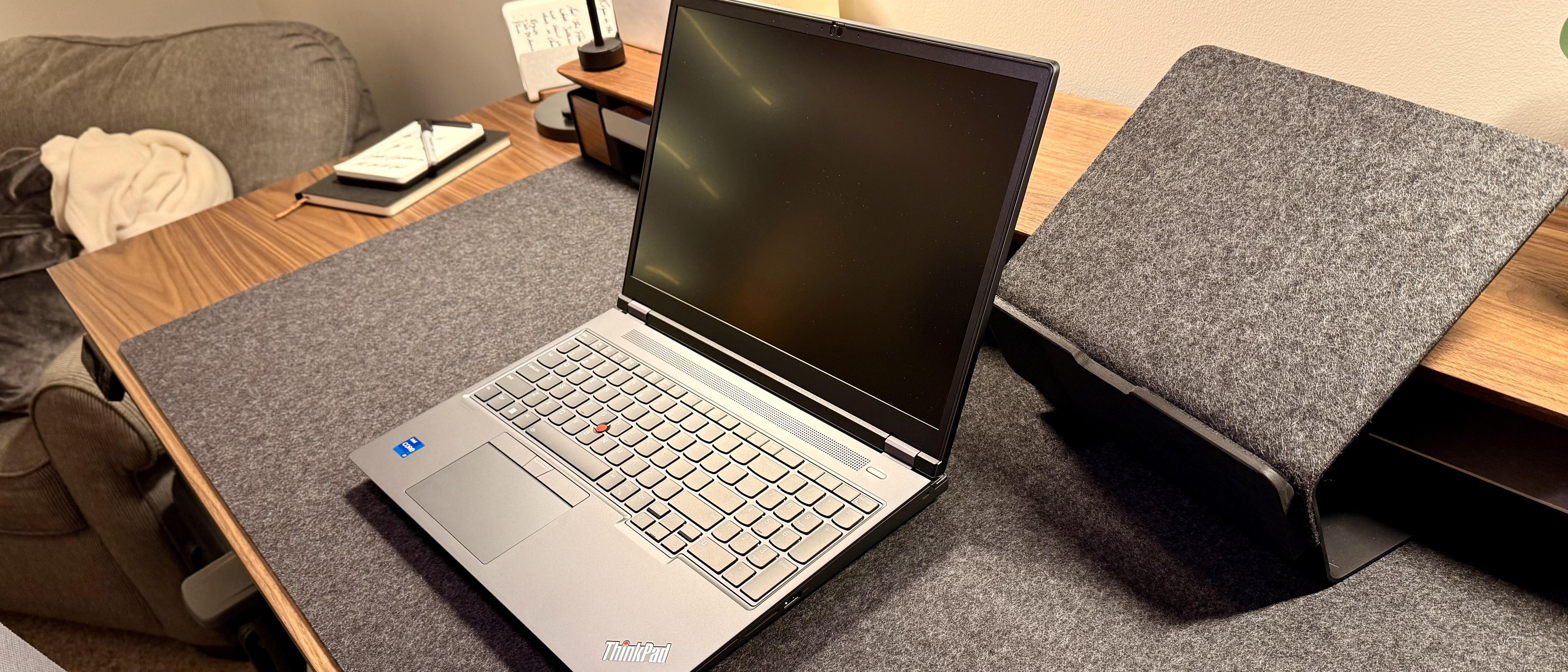
Introduction
If your work involves 3D rendering, CAD modeling, video editing, or AI development, a standard laptop simply won't cut it. You need a mobile workstation a machine built to handle desktop-class workloads without being tethered to a desk. The Lenovo P16 Gen 2 (officially the Lenovo ThinkPad P16 Gen 2) is one of the most talked-about options in this category, and for good reason.
In this article, we'll break down everything you need to know about the Lenovo P16 Gen 2: its design, performance, display options, upgradeability, and real-world usability. We'll also compare it against two strong rivals the Dell Precision 5690 and the Dell Precision 7780 so you can decide which workstation actually deserves your budget. By the end, you'll have a clear, practical understanding of whether this laptop belongs on your shortlist.
What Is the Lenovo P16 Gen 2?
The Lenovo P16 Gen 2 is Lenovo's flagship 16-inch mobile workstation, positioned above the lighter P16v Gen 2 and P16s Gen 2 models. It's built for engineers, architects, video professionals, data scientists, and anyone who needs serious computing power in a portable (if heavy) chassis.
Unlike consumer laptops that prioritize thinness and battery life, the P16 Gen 2 prioritizes raw performance, thermal headroom, and expandability. It's part of the broader ThinkPad P-series lineup, a family long trusted by IT departments and professionals for its durability and MIL-SPEC-tested build quality.
Key Specifications at a Glance
Based on available configurations, the Lenovo P16 Gen 2 typically includes:
-
Processor: Up to Intel Core i7-14700HX (14th-gen, 20 cores/28 threads), part of the Raptor Lake-HX refresh lineup
-
Graphics: Options ranging from NVIDIA RTX 1000 Ada up to the RTX 5000 Ada Generation GPU
-
Memory: Up to 192GB of RAM across configurations, giving it enormous headroom for memory-intensive workloads
-
Storage: Dual SSD slots, supporting large, fast storage configurations
-
Display: 16-inch panels in 16:10 aspect ratio, available in FHD+ (1920×1200), QHD+ (2560×1800, up to 165Hz), 4K+ (3840×2400), and 4K+ OLED options
-
Weight: Around 6.5 lbs this is not a machine built for daily commuting comfort
This kind of configuration flexibility is exactly why the P16 Gen 2 appeals to such a wide range of professionals. A video editor might prioritize the OLED panel and high RAM ceiling, while a CAD engineer might care more about the RTX 4000 or 5000 Ada GPU and dual-SSD setup.
Performance: Where the P16 Gen 2 Shines
Workstation buyers care about one thing above all else: can the machine handle demanding, professional-grade workloads without choking? Independent testing suggests the Lenovo P16 Gen 2 performs impressively in this regard.
In benchmark testing using SPECworkstation3, which evaluates CPU, graphics, I/O, and memory bandwidth across categories like media and entertainment, financial services, and product development, the ThinkPad P16 Gen 2 demonstrated strong capability in GPU-heavy workloads. In SPECviewperf testing the industry standard for measuring graphics performance in professional applications the Lenovo model consistently led competing machines by a wide margin, particularly in 3D rendering tasks.
This GPU strength isn't surprising once you consider the hardware. The top configuration pairs a 130W NVIDIA RTX 4000 Ada Generation GPU with 12GB of dedicated VRAM, making it one of the fastest 16-inch workstations in Lenovo's current lineup though this power comes with tradeoffs in temperature and fan noise.
CPU Performance
While the GPU is a clear strength, CPU-bound tasks tell a slightly different story. In some head-to-head comparisons, competing workstations with different processor and cooling designs actually outpaced the ThinkPad in pure CPU benchmarks, even as Lenovo maintained its lead in GPU-heavy tasks. This suggests the P16 Gen 2 is best suited for GPU-bound work rendering, simulation, and visualization rather than pure CPU-crunching tasks like large-scale compilation or certain scientific computing workloads.
Real-World Application
For professionals working in SolidWorks, AutoCAD, Blender, DaVinci Resolve, or similar GPU-accelerated software, the P16 Gen 2's graphics muscle translates directly into faster render times and smoother viewport navigation. This is the machine's core selling point: it behaves less like a laptop and more like a desktop tower you can fold shut.
Display Quality: More Options Than Most Competitors
Lenovo offers several display options for the ThinkPad P16, all 16.0 inches in the 16:10 aspect ratio, including FHD+, QHD+, 4K+ IPS, and 4K+ OLED panels. The QHD+ IPS panel runs at up to 165Hz, while the other panel options are limited to a standard 60Hz refresh rate.
This variety matters. A colorist or photo editor will likely gravitate toward the 4K+ OLED for its contrast and color accuracy, while someone who values smoothness say, for quick 3D model manipulation might prefer the high-refresh QHD+ panel instead.
That said, color accuracy out of the box has drawn some criticism. One reviewer noted that Lenovo's included X-Rite Color Assistant utility offers several factory calibration profiles, but none produced particularly strong results when tested with a colorimeter a notable shortcoming for a laptop marketed toward color-sensitive professional work. If your work depends on precise color reproduction, you may want to budget for third-party calibration.

Build, Ports, and Expandability
One of the P16 Gen 2's biggest advantages over sleeker consumer ultrabooks is its serviceability. Expandability is one of the primary reasons professionals choose this machine for anyone who prefers upgrading components over time rather than being locked into soldered, non-upgradable hardware, the P16 Gen 2 is a clear win.
Notable strengths highlighted by reviewers include fantastic overall power, the 165Hz display option, a great keyboard, upgradable RAM, and dual SSD slots. On the downside, the laptop weighs roughly 6.5 lbs, runs hot under sustained load, delivers poor battery life, and notably cannot be charged via USB-C.
That last point catches many buyers off guard in an era where most premium laptops support USB-C charging, the P16 Gen 2's reliance on a proprietary barrel-style charger feels like a step backward, even if it's tied to delivering enough sustained wattage for the powerful internals.
Battery Life: Not the Focus
With its powerful CPU and GPU combination, the P16 Gen 2 performs best when plugged into a wall outlet. Under light use you can expect a few hours of battery life, but that drains quickly once demanding tasks begin. This isn't a laptop designed for all-day untethered productivity it's designed for raw output, with the expectation that it'll spend most of its working life near a power outlet.
Lenovo P16 Gen 2 vs. Dell Precision 5690
The Dell Precision 5690 is one of the most direct competitors to the Lenovo P16 Gen 2, and it's frequently named alongside machines like the HP ZBook Power 16 G11 as a key rival in the 16-inch mobile workstation category.
Here's how the two generally stack up based on positioning and available data:
|
Feature |
Lenovo P16 Gen 2 |
Dell Precision 5690 |
|
Design philosophy |
Bulkier, rugged ThinkPad chassis |
Slimmer, more premium industrial design |
|
GPU ceiling |
Up to RTX 5000 Ada |
Competitive Ada-generation options |
|
Upgradability |
Dual SSD slots, user-upgradable RAM |
More streamlined, less field-serviceable |
|
Display |
Widest range, including 4K+ OLED at 16:10 |
Strong color-accurate panel options |
|
Weight |
Heavier (~6.5 lbs) |
Generally lighter, more portable |
|
Charging |
Proprietary charger only |
More modern connectivity options |
Broadly speaking, the Lenovo P16 Gen 2 wins on raw configurability and GPU horsepower, while the Dell Precision 5690 tends to appeal to professionals who want a slightly more portable, refined chassis without sacrificing too much performance. If you rarely open your machine's chassis and prioritize a sleeker daily-carry experience, the Dell may suit you better. If you want maximum future-proofing through upgrades, Lenovo has the edge.
Where the Dell Precision 7780 Fits In
For professionals who need even more power than either of these machines offers, the Dell Precision 7780 represents the next tier up a larger, 17-inch mobile workstation built for the most demanding workloads, such as heavy simulation, large dataset processing, or high-end 3D content creation.
Compared to the Lenovo P16 Gen 2, the Precision 7780 typically trades portability for even more expansion room, larger cooling systems, and higher sustained performance ceilings. If your workload genuinely maxes out a 16-inch workstation, the 7780 (or Lenovo's own P17-class equivalents) is worth researching. But for the vast majority of professional users, the 16-inch class including the P16 Gen 2 and Precision 5690 hits the sweet spot between power and portability.
Pricing and Value
The base configuration of the Lenovo P16 Gen 2 has historically started at around $2,619, featuring an Intel Core i7-14700HX processor, 32GB of RAM, a 1TB SSD, an entry-level RTX 1000 Ada GPU, and an FHD+ IPS display. Pricing climbs quickly as you add higher-tier GPUs, more RAM, and premium display options it's not unusual for a fully loaded configuration to cost significantly more.
Given the performance on offer, most reviewers consider this pricing fair for the workstation category, though it's undeniably a serious investment reserved for professionals whose work directly benefits from the extra power not casual users or students.
Pros and Cons Summary
Pros
-
Excellent GPU performance for rendering, CAD, and creative workloads
-
Wide range of display options, including a 165Hz QHD+ panel and 4K+ OLED
-
Highly upgradable: dual SSD slots and accessible RAM
-
Durable, ThinkPad-grade build quality
-
Comfortable, well-regarded keyboard
Cons
-
Heavy at roughly 6.5 lbs not ideal for frequent travel
-
Runs hot and can be noisy under sustained load
-
Poor battery life away from a power outlet
-
No USB-C charging support
-
Factory display color calibration isn't consistently accurate
Frequently Asked Questions
Is the Lenovo P16 Gen 2 good for gaming? It can run modern games well thanks to its powerful GPU options, but it's not designed or marketed as a gaming laptop. You're paying a premium for workstation-grade reliability and certification, not gaming-specific features.
How does the Lenovo P16 Gen 2 compare to the Dell Precision 5690 for CAD work? Both handle professional CAD software competently. The Lenovo edges ahead in raw GPU benchmarks and offers more configuration flexibility, while the Dell Precision 5690 tends to offer a more refined, lighter chassis for professionals who travel frequently.
Can I upgrade the RAM and storage myself? Yes. One of the P16 Gen 2's standout features is its accessible design, with dual SSD slots and upgradable memory a rarity among modern high-performance laptops.
Is the Dell Precision 7780 overkill compared to the Lenovo P16 Gen 2? For most 16-inch-class workloads, yes. The Precision 7780 is aimed at users who need a 17-inch chassis and the added cooling and expansion room that comes with it. Unless your workload specifically demands that extra headroom, the P16 Gen 2 will likely suffice.
What's the biggest drawback of the Lenovo P16 Gen 2? Battery life and the lack of USB-C charging are the most commonly cited frustrations, alongside its considerable weight.
Conclusion
The Lenovo P16 Gen 2 earns its reputation as a genuine powerhouse mobile workstation. With flexible GPU options up to the RTX 5000 Ada, a wide range of display choices, and standout upgradability, it's built for professionals who need desktop-class performance without a full desktop setup. It's not without compromises battery life, weight, and heat under load are real considerations but for engineers, 3D artists, and creative professionals, those tradeoffs are often worth it.
When weighed against alternatives like the Dell Precision 5690 or the larger Dell Precision 7780, the right choice ultimately comes down to your priorities: portability, upgradability, or maximum raw power. Whichever machine you choose, make sure it's matched to your actual workflow rather than just its spec sheet.
What's your take? If you've used the Lenovo P16 Gen 2, the Dell Precision 5690, or the Precision 7780 for professional work, share your experience in the comments below and if you found this comparison helpful, pass it along to a colleague who's shopping for their next workstation.

 English
 Arabic
 French
 Spanish
 Portuguese
 Deutsch
 Turkish
 Dutch
Dutch
 Italiano
 Russian
 Portuguese (Brazil)
 Greek
Greek