


Microsoft Surface Pro: The Ultimate 2-in-1 Review

Microsoft Surface Pro: The Complete 2026 Buyer's Guide
Introduction
Few devices have shaped the modern 2-in-1 category quite like the Microsoft Surface Pro. Since its debut, it has tried to answer a deceptively simple question: can one machine truly replace both your laptop and your tablet? With the 2026 lineup, Microsoft has pushed that idea further than ever, pairing a redesigned chip lineup with sharper displays and business-grade connectivity.
In this guide, you'll learn exactly what's new in the latest Surface Pro, how it stacks up against workstation-class machines like the Lenovo ThinkPad P16 Gen 2, and how it compares to sleek ultrabook alternatives such as the Samsung Galaxy Book5 Pro. Whether you're a student, a creative professional, or a business buyer trying to justify the price tag, this article breaks down everything you need before you spend your money.
What's New in the 2026 Surface Pro Lineup
Microsoft split its 2026 Surface Pro rollout into two waves. The first wave, aimed at business customers, launched in spring 2026 with Intel Core Ultra chips and only modest design tweaks over the previous generation. The second wave arrived in June 2026 with the consumer-focused Surface Pro 13-inch (12th Edition), powered by Qualcomm's new Snapdragon X2 chips.
This 12-core processor is a substantial leap over the previous Snapdragon X Elite, and Microsoft says it delivers meaningfully higher overall performance. The built-in Hexagon NPU also jumps to 80 TOPS of AI processing power, nearly double the previous model's capability, which translates into snappier on-device AI features like Copilot, live captioning, and image generation.
Key specs of the 2026 Surface Pro 13-inch include:
-
Processor: Snapdragon X2 Plus or Snapdragon X2 Elite
-
Display: 13-inch PixelSense touchscreen, 2880 x 1920 resolution, 120Hz refresh rate, with an optional OLED panel
-
Memory: Up to 64GB of RAM
-
Storage: Removable SSD, a rare and welcome feature for a tablet-style device
-
Connectivity: Wi-Fi 7, optional 5G, Thunderbolt 4/USB4
-
Pen and Touch: Updated Surface Slim Pen with new haptic feedback support
There's also a business-oriented Surface Pro variant running Intel's newer Core Ultra chips with Intel Xe3 graphics, a 3:2 IPS touchscreen, and the same 120Hz refresh rate, aimed at organizations that prefer x86 compatibility over the ARM-based Snapdragon models.
One notable shift: pricing has climbed. The new consumer Surface Pro starts at $1,499, up from the previous generation's $999 starting price. Microsoft has attributed part of that increase to ongoing memory and component shortages affecting the wider industry, not just its own product line.
Design and Display: Still the Category Benchmark
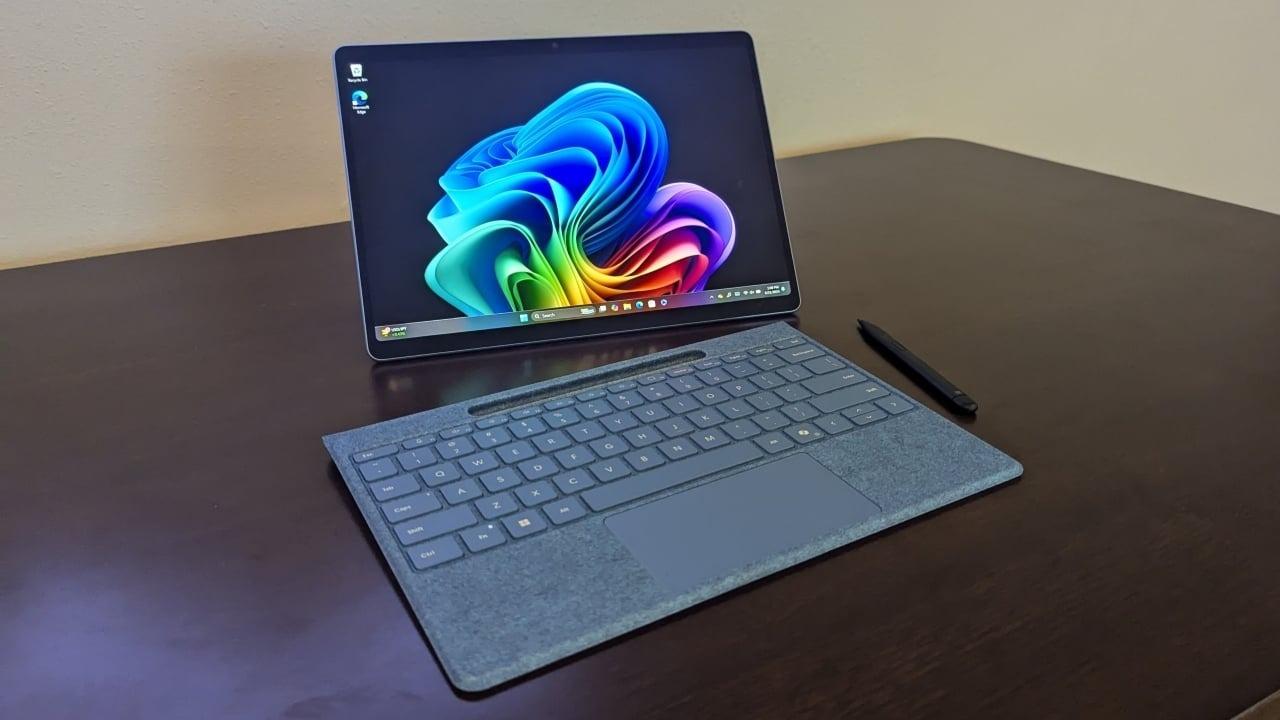
The Surface Pro's signature kickstand-and-keyboard design remains one of its biggest selling points. It transforms from a slim tablet into a fully functional laptop in seconds, and the build quality continues to earn praise for its portability and premium feel. The 3:2 aspect ratio display is taller than typical 16:9 laptop screens, which makes a real difference for reading documents, browsing the web, or sketching in portrait orientation.
The optional OLED PixelSense display is a meaningful upgrade for anyone who spends hours looking at the screen, offering richer contrast and more vibrant colors than the standard IPS panel. Combined with Gorilla Glass 5 protection and pen support, the Surface Pro continues to appeal strongly to digital artists, note-takers, and hybrid workers who move between typing and touch input throughout the day.
Performance: Where the Surface Pro Fits
It's worth setting expectations correctly. The Surface Pro line has increasingly positioned itself as a premium productivity and creativity tool rather than a raw performance machine that role has shifted to Microsoft's Surface Laptop lineup. Even so, the Snapdragon X2 Elite chip represents a significant leap in performance, and Microsoft claims it can outperform Apple's M4 chip on several common benchmarks, putting it in a competitive position against the current generation of ARM-based ultraportables.
For everyday multitasking, web browsing, video calls, and Office workloads, the Surface Pro handles itself well. But for anyone doing sustained video rendering, CAD work, or 3D modeling, it's simply not built for that kind of sustained heavy lifting and that's exactly where a machine like the Lenovo ThinkPad P16 Gen 2 enters the conversation.
Microsoft Surface Pro vs. Lenovo ThinkPad P16 Gen 2: Two Very Different Machines
While both devices could theoretically land on a business procurement list, they serve almost entirely different purposes.
The Lenovo ThinkPad P16 Gen 2 is a genuine mobile workstation. It's built around high-performance Intel Core processors paired with Nvidia RTX Ada-generation graphics, supports up to 192GB of RAM, and offers dual storage drives for expandability. Reviewers have consistently praised its dominance in GPU-heavy workloads like 3D rendering and CAD simulation, alongside a comfortable keyboard and highly configurable display options ranging from FHD+ to 4K+ OLED.
The trade-offs are significant, though. The ThinkPad P16 Gen 2 weighs around 6.5 pounds, runs hot under sustained load, and delivers noticeably weaker battery life when running demanding applications. It's also priced well above typical consumer laptops, starting at roughly $2,600.
So how do you choose between them? If your work involves engineering software, 3D rendering, or GPU-accelerated applications, the ThinkPad P16 Gen 2's raw horsepower is hard to match. If you want portability, all-day usability, and a device that doubles as a tablet, the Surface Pro remains the more practical daily driver.
Where the Samsung Galaxy Book5 Pro Fits In
For buyers who want a traditional clamshell laptop rather than a 2-in-1 or a mobile workstation, the Samsung Galaxy Book5 Pro is worth a look. It pairs an Intel Core Ultra processor with a striking AMOLED display, an all-aluminum chassis, and notably strong battery life some reviewers have reported over 12 hours of real-world use, with Samsung claiming up to 19–21 hours under light workloads on certain configurations.
Compared to the Surface Pro, the Galaxy Book5 Pro leans harder into display quality and battery longevity rather than versatility. It doesn't offer a detachable tablet mode or pen-first design, and its performance sits roughly in line with other Lunar Lake-powered ultrabooks rather than pushing any performance boundaries. For buyers deep in the Samsung ecosystem, its Galaxy AI integration and cross-device continuity features add extra appeal that the Surface Pro can't fully replicate.
Real-World Use Cases
The traveling consultant: Someone who lives out of a laptop bag benefits enormously from the Surface Pro's light weight, kickstand design, and ability to switch between tablet and laptop modes during flights, client meetings, and hotel rooms.
The mechanical engineer: A professional running SolidWorks or rendering complex 3D models needs the Lenovo ThinkPad P16 Gen 2's dedicated GPU and expandable RAM far more than they need portability or a touchscreen.
The content-focused professional: Someone who spends most of their day in documents, spreadsheets, and video calls, and who values display quality and battery life above all else, may find the Samsung Galaxy Book5 Pro the more comfortable long-term fit.
Pros and Cons of the Microsoft Surface Pro
Pros:
-
Excellent portability with genuine tablet-to-laptop versatility
-
Sharp, tall 3:2 display with an optional vivid OLED panel
-
Removable SSD storage, unusual for this device category
-
Strong AI processing thanks to the upgraded NPU
-
Business-friendly connectivity, including optional 5G
Cons:
-
Noticeably higher starting price than previous generations
-
Not designed for GPU-intensive or sustained heavy workloads
-
Keyboard and pen are sold separately in many configurations
-
ARM-based models may face occasional software compatibility quirks
Frequently Asked Questions
Is the Microsoft Surface Pro good for gaming? It can handle light and casual games, but its integrated graphics aren't built for demanding titles. Dedicated gaming laptops or workstations like the ThinkPad P16 Gen 2 are better suited for that.
Does the Surface Pro come with a keyboard included? In most configurations, the Type Cover keyboard and Slim Pen are sold separately, which is worth factoring into your total budget.
How does Surface Pro battery life compare to the Galaxy Book5 Pro? The Galaxy Book5 Pro is generally regarded as the stronger battery performer of the two, with some models rated for well beyond 12 hours of real-world use.
Is the Snapdragon-based Surface Pro compatible with all Windows software? Most mainstream apps run well thanks to emulation improvements, but certain specialized or older x86-only software may still run better on an Intel-based model.
Conclusion
The Microsoft Surface Pro remains one of the most versatile 2-in-1 devices on the market, blending a genuinely useful tablet mode with laptop-grade productivity. It's not trying to compete with a mobile workstation like the Lenovo ThinkPad P16 Gen 2, nor does it aim to match the battery-life dominance of the Samsung Galaxy Book5 Pro instead, it carves out its own space as the go-to choice for people who need flexibility above all else.
If portability, pen input, and all-in-one versatility matter most to you, the Surface Pro is worth the investment despite its higher price tag. If your work demands serious graphics horsepower, look toward the ThinkPad P16 Gen 2 instead.
What matters most to you in your next laptop power, portability, or battery life? Share your thoughts in the comments, and don't forget to share this guide with anyone shopping for a new 2-in-1 this year.

 English
 Arabic
 French
 Spanish
 Portuguese
 Turkish
 Dutch
Dutch
 Italiano
 Russian
 Romaian
 Portuguese (Brazil)
 Greek
Greek