


Dell XPS 16 9640 Review: Power Meets Design
Introduction
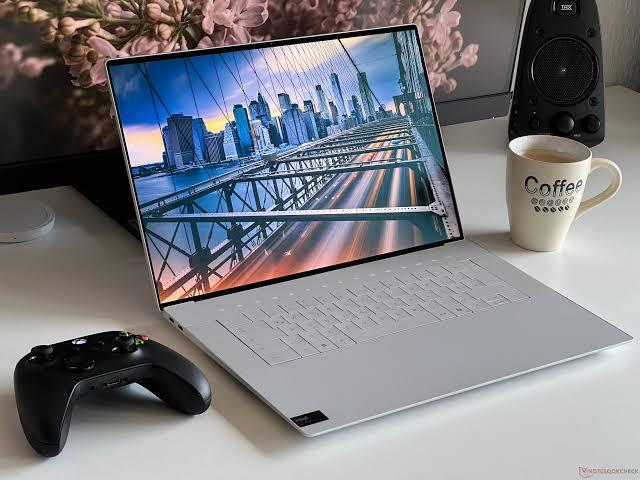
If you've been shopping for a premium Windows laptop this year, chances are the Dell XPS 16 9640 has landed on your shortlist. As Dell's first-ever 16-inch entry in the XPS lineup effectively replacing the long-running XPS 15 this machine tries to do something ambitious: pair the brand's signature minimalist design with genuine creative and gaming muscle.
But is it actually worth the investment, especially with strong alternatives like the Lenovo Yoga Pro 9 on the market? In this article, we'll break down the Dell XPS 16 9640's design, performance, display quality, battery life, and value, plus how it compares to competitors so you can decide whether it belongs on your desk.
By the end, you'll know exactly who this laptop is for, who should skip it, and what to expect if you buy one.
What Is the Dell XPS 16 9640?
The Dell XPS 16 9640 is a 16.3-inch premium laptop built around Intel's Core Ultra ("Meteor Lake") processors and Nvidia's RTX 4000-series mobile graphics. It sits at the top of Dell's consumer lineup, positioned as a machine for creators, professionals, and power users who want desktop-like performance without sacrificing portability or style.
Dell offers the XPS 16 9640 in two chassis colors Platinum and Graphite and it starts at roughly $1,499 for a base configuration, climbing toward $4,000+ for the most powerful builds with a 4K OLED touch display and top-tier GPU.
Key Specifications at a Glance
-
Display: 16.3-inch options ranging from FHD+ IPS up to 4K+ OLED touch, with up to a 90Hz refresh rate
-
Processor: Intel Core Ultra 7 155H or Core Ultra 9 185H (Meteor Lake, with integrated NPU for AI tasks)
-
Graphics: Intel Arc integrated graphics, or discrete Nvidia GeForce RTX 4050, RTX 4060, or RTX 4070
-
Memory: Up to 64GB of RAM (soldered on higher-end configurations)
-
Storage: Up to 2TB of Gen 4 SSD storage
-
Weight: Roughly 4.7 pounds
-
Thickness: About 0.71 inches
-
Ports: Three Thunderbolt 4 (USB-C) ports, a microSD card reader, and a headphone jack, with USB-A and HDMI adapters included
-
Audio: Quad-speaker setup tuned with Waves MaxxAudio Pro
-
Connectivity: Wi-Fi 7 support
-
Webcam: 1080p front-facing camera
Design and Build Quality
Dell didn't reinvent the wheel here and that's mostly a good thing. The XPS 16 9640 continues the brand's signature CNC-machined aluminum chassis, a design language that has drawn comparisons to Apple's MacBook Pro for years. The result is a laptop that feels genuinely premium: rigid, cool to the touch, and free of noticeable flex.
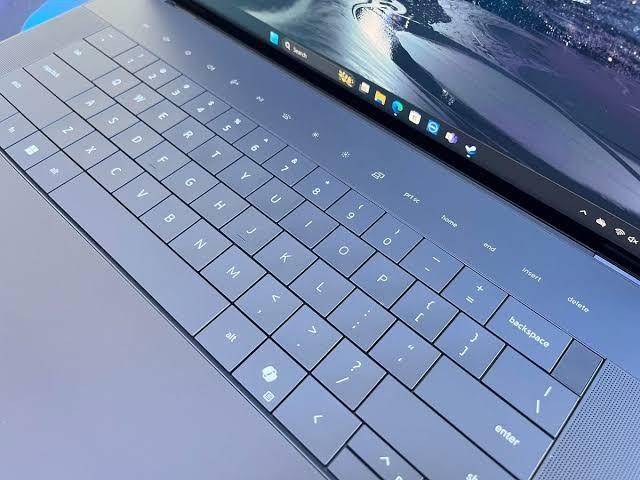
Where the XPS 16 gets more polarizing is in its minimalist interface choices. Dell equipped this model with:
-
A capacitive, invisible touchpad with haptic feedback instead of a traditional clickpad
-
Capacitive function row buttons that replace physical keys
-
A backlit keyboard with large keycaps that most reviewers find comfortable once you adjust to the layout
These design choices genuinely divide opinion. Some users love the futuristic, seamless look; others find the lack of tactile feedback on the touchpad and function row frustrating for everyday use. If you're the kind of person who prefers physical buttons and a traditional trackpad, it's worth testing this laptop in person before buying.
Display: The Real Star of the Show
The standout feature of the Dell XPS 16 9640 is unquestionably its display. The top-tier configuration includes a 16.3-inch 4K OLED touchscreen with a 90Hz refresh rate a combination that's still relatively rare in the Windows laptop space.
In color accuracy testing, reviewers measured the panel hitting 100% of the sRGB gamut, 100% of DCI-P3, and roughly 89% of Adobe RGB, making it a genuinely strong option for photo editing, video work, and general content creation. Deep blacks, vibrant colors, and wide viewing angles round out an excellent viewing experience, whether you're color-grading a video project or just streaming a movie.
Lower-tier configurations swap the OLED panel for an IPS display, which sacrifices some contrast and color depth but keeps costs down and can improve battery life slightly.
Performance: How Does It Actually Handle Real Work?
Under the hood, the Dell XPS 16 9640 is built around Intel's Core Ultra 7 155H or Core Ultra 9 185H chips, both part of the Meteor Lake generation with a dedicated NPU for AI-accelerated tasks like background blur, noise cancellation, and certain Copilot+ features.
For graphics, buyers can choose between integrated Intel Arc graphics or step up to Nvidia's discrete RTX 4050, RTX 4060, or RTX 4070 GPUs. The RTX 4070 configuration is paired with vapor chamber cooling and faster soldered memory, giving it a meaningful edge over the lower-tier GPU options, which rely on a simpler thermal system.
In sustained workloads, testers found the Core Ultra 7 155H could maintain a 60W power limit and a 3.0GHz P-core clock speed even under prolonged 100% CPU stress a solid result that points to effective thermal engineering. The dual-fan cooling system stays relatively quiet, and the keyboard doesn't get uncomfortably warm, even during gaming sessions.
While this isn't a dedicated gaming laptop, the RTX 4070 configuration is capable of running recent titles at solid frame rates, provided you're willing to adjust resolution and graphics settings. For creative professionals running video editing software, 3D rendering tools, or AI-assisted applications, the combination of a capable CPU, dedicated GPU, and NPU makes the XPS 16 9640 a genuinely productive machine.
Battery Life
Battery life is one area where the Dell XPS 16 9640 shows some real-world compromises. Reviewers describe it as "variable," largely depending on configuration the higher-resolution OLED display and discrete GPU models draw more power than the IPS-based, integrated-graphics configurations.
If all-day battery life untethered from a charger is your top priority, ARM-based competitors (like Apple's MacBook Pro lineup) still generally outlast Intel-powered machines like the XPS 16. That said, for a typical workday of document editing, web browsing, and video calls, most users should be able to get through a solid stretch without needing to reach for the charger.
Dell XPS 16 9640 vs. Lenovo Yoga Pro 9
The most direct competitor to the Dell XPS 16 9640 in the 16-inch premium creator-laptop space is the Lenovo Yoga Pro 9. Both laptops target the same buyer: someone who wants a large, high-resolution display, strong CPU/GPU performance, and a premium aluminum chassis.
Here's how they compare on the key points:
|
Feature |
Dell XPS 16 9640 |
Lenovo Yoga Pro 9 |
|
Display |
Up to 16.3" 4K OLED, 90Hz |
Up to 16" 2.8K/3.2K OLED or Mini LED |
|
CPU |
Intel Core Ultra 7/9 (Meteor Lake) |
Intel Core Ultra 5/7/9 (varies by generation) |
|
GPU |
Up to RTX 4070 |
Up to RTX 4070/5050 depending on generation |
|
Touchpad/Keyboard |
Capacitive, buttonless, minimalist |
Traditional, more conventional layout |
|
Storage expansion |
Single SSD slot on most configs |
Dual M.2 slot on some 16-inch models |
|
Design |
Ultra-minimalist, MacBook-inspired |
Premium aluminum, more traditional |
The Lenovo Yoga Pro 9 tends to appeal to buyers who want similarly premium materials and display quality but prefer conventional physical keys and a standard clickpad rather than Dell's capacitive interface. Some Yoga Pro 9 configurations also offer a second internal M.2 slot for storage expansion, which the XPS 16 generally lacks. On the other hand, Dell's chassis rigidity and overall fit-and-finish are frequently cited as a slight edge over Lenovo's larger 16-inch models, which some reviewers have noted can develop a bit of chassis flex or creaking under pressure.
If ultimate performance is the goal and budget isn't a constraint, it's also worth knowing that Dell's own Dell Alienware 18 exists at the far end of the spectrum a considerably larger, heavier, gaming-first machine with far more powerful GPU options. It's not a direct competitor to the XPS 16 9640, but it's useful context: the XPS 16 is a creator-first machine with gaming capability, not a gaming laptop with creator features.
Real-World Use Cases
To put the specs in context, here's how the Dell XPS 16 9640 performs across common use cases:
Video editing and content creation: With the RTX 4070 configuration and 32GB+ of RAM, the XPS 16 handles 4K video editing in tools like Premiere Pro or DaVinci Resolve comfortably, particularly with GPU-accelerated exports.
Photography and design work: The near-100% DCI-P3 and sRGB coverage on the OLED panel makes color-critical work like photo retouching in Lightroom or Photoshop reliable without needing an external reference monitor.
Everyday productivity: For spreadsheets, email, and document work, the XPS 16 is arguably overkill, but it handles multitasking across dozens of browser tabs and applications without hesitation, thanks to the Core Ultra 7/9 chips and ample RAM.
Light gaming: While not marketed as a gaming laptop, the RTX 4070 configuration can run modern AAA titles at 1440p with adjusted settings, making it a reasonable dual-purpose machine for work and play.
Pros and Cons
Pros
-
Gorgeous, premium aluminum chassis with excellent build quality
-
Outstanding 4K OLED display option with wide color gamut coverage
-
Strong CPU performance that sustains high clocks under load
-
RTX 4070 configuration delivers solid creative and light-gaming performance
-
Wi-Fi 7 support and modern Thunderbolt 4 connectivity
-
Effective, quiet cooling system
Cons
-
Capacitive touchpad and function row take real adjustment time
-
Battery life is inconsistent across configurations
-
High-end configurations get expensive quickly
-
Limited internal storage expansion on most models
-
Heavier than more portable 14-inch alternatives
Frequently Asked Questions
Is the Dell XPS 16 9640 good for gaming? It's not a dedicated gaming laptop, but the RTX 4070 configuration can run most modern games at reduced settings or resolution. If gaming is your primary use case, a laptop built specifically for it will offer better thermals and frame rates for the price.
How much does the Dell XPS 16 9640 cost? Pricing generally starts around $1,499 for a base configuration and can climb past $4,000 for models with the 4K OLED touch display, Core Ultra 9 processor, and RTX 4070 GPU.
Is the touchpad hard to get used to? Many reviewers note an adjustment period with the capacitive, buttonless touchpad and function row. It's a design choice that some users grow to love and others never quite adapt to trying it in person is recommended if possible.
How does it compare to the Dell XPS 14 9440? The XPS 14 offers the same design language and build quality in a lighter, more portable package, including an optional UHD+ display. It's a strong alternative if the XPS 16's size and weight are a concern.
Does it support external GPUs or extra storage? Most configurations include a single SSD slot, limiting internal storage expansion compared to some competitors. Thunderbolt 4 ports do allow for external storage and eGPU setups if needed.
Conclusion
The Dell XPS 16 9640 is a genuinely impressive laptop for creators and professionals who value display quality, build craftsmanship, and solid all-around performance. Its 4K OLED display, capable Core Ultra processors, and up-to-RTX-4070 graphics make it a strong choice for video editing, photography, and general power-user tasks as long as you're comfortable with its minimalist, capacitive interface and are prepared for a premium price tag.
If you're deciding between this and something like the Lenovo Yoga Pro 9, the choice largely comes down to whether you prefer Dell's ultra-minimalist design or Lenovo's more traditional interface, along with your budget and storage needs.
Have you used the Dell XPS 16 9640, or are you deciding between it and another 16-inch laptop? Share your experience in the comments below, and pass this guide along to anyone shopping for a premium creator laptop.

 English
 Arabic
 French
 Spanish
 Portuguese
 Turkish
 Dutch
Dutch
 Italiano
 Russian
 Romaian
 Portuguese (Brazil)
 Greek
Greek